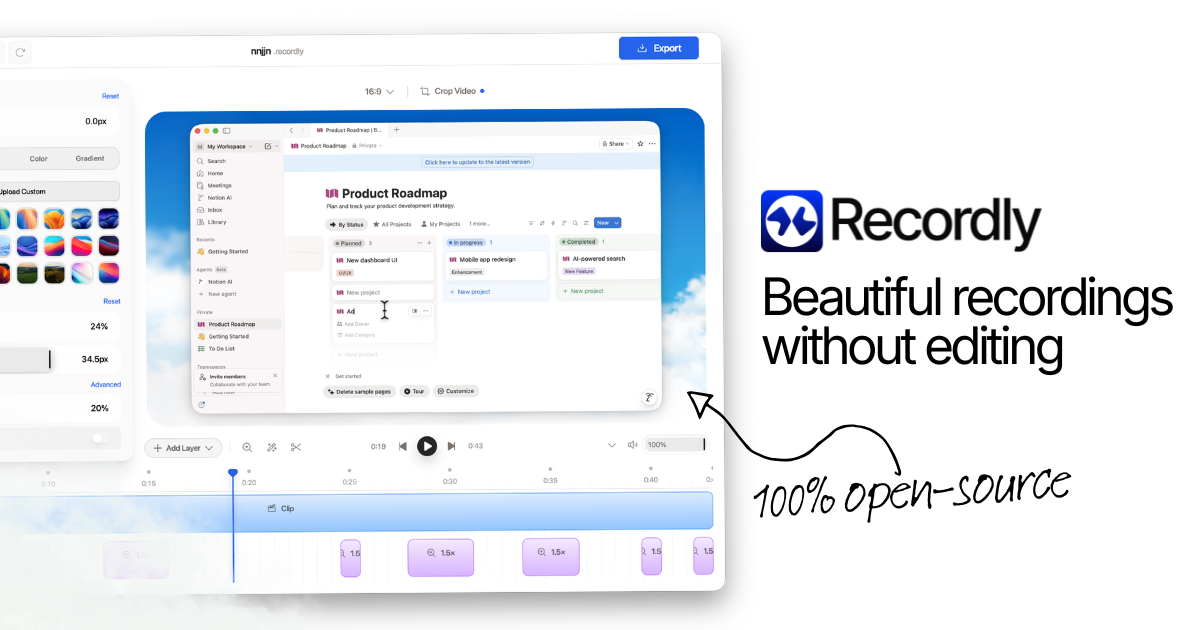
Transform quick screen captures into sleek, professional product videos with Recordly. Built specifically for developers, creators, and product builders, Recordly handles the tedious parts of video production so you can spend less time editing and more time shipping.
Capture your screen while Recordly automatically enhances your video with silky cursor animations, dynamic auto-zooming on click actions, and customizable background canvases. Edit your clips using an intuitive drag-and-drop timeline, overlay your webcam feed, and export crisp MP4s or seamless looping GIFs ready for social media, documentation, or product launches.
Key Features
- Auto-Zoom & Silky Cursor: Automatically smooth out jumpy mouse movements and zoom into active regions to keep your viewers focused on what matters.
- Dynamic Webcam Bubble: Use smart webcam overlays that dynamically expand and shrink, making sure you get the spotlight exactly when you need it.
- Dual-Source Audio Sync: Record microphone commentary and internal system audio simultaneously with sample-accurate synchronization.
- Drag-and-Drop Timeline Editor: Fine-tune video length, playback speed, zoom points, annotations, and audio tracks directly within the built-in timeline editor.
- External Media Import: Layer external audio tracks or separate webcam footage straight into your project timeline for maximum creative control.
- Looping Cursor Paths for GIFs: Generate flawless, stutter free looping GIFs with seamless cursor paths, ideal for continuous inline web clips and documentation.
- Project File Management: Save your work as .recordly files to pause, revisit, or refine your video layouts and choices anytime.
- 100% Free & Open-Source: No paywalls, hidden export limits, or forced watermarks. Entirely community-driven and free for both personal and commercial use.
Perfect For
- Software Developers & Creators: Showcase new features, pull requests, and updates with professional polish.
- Educators & Course Creators: Produce step-by-step software walkthroughs and instructional content.
- Product Managers & Marketers: Craft eye catching GIFs and short demo videos for social posts and landing pages.